Monday, March 23, 2015

Houston, we have a problem


Manager: I need you to image 5 computers for packing stations in the warehouse.
Me: Ok. I've never imaged those particular computers. Do you know where the image file is located?
Manager: Ask William. He'll know.

Me: William, where can I find the pack station image?
William: It should be on the CIFs.
Me: Do you know WHICH share?
William: Ask the guys in Ohio. They should know.

Me: Hey guys, do you know where I can find the pack station image?
Ohio tech: It's on the shared drive.
Me:...WHERE on the shared drive?
Ohio tech:The two images we use the most are SpeedFbuntu-10.04-packing-new-building
for pack station and SpeedFbuntu-10.04-the-rest-new-building for lead or returns stations.
Me: Ok...but WHERE on the share are they located??
Ohio tech: *silence*
Ohio Lead: The images we use won't work at your location.
Me: *sigh*

Yep...it's Monday.


Friday, March 6, 2015

Ah management...


I thought I'd do something a little different in this post. We have a weekly meeting/conference call. This is what one of my tech's Tweeted (and FYI, I'm not the boss he was referring to...lol) He was Tweeting this live during our meeting and told me about it after the fact. He is referring to systems that I had put together a few months ago. 

 First Tweet: "Yeah, you know that spreadsheet you do everyday to track your work? Yeah, that's been useless. So we're going to expand it."
My boss ladies and gentlemen.

Second Tweet: "Hey, you know that asset tracking system you put together and I told you we were going to do something else? Yeah, keep doing that system anyways."

Final Tweet: "On second thought, yeah don't do that. The original plan we shelved you for is back on. Or maybe not. Wait, I don't want to make decisions."

I love this guy! LOL

Friday, February 20, 2015

And people wonder why tech's don't talk much...


Today I had been working on some computers in the call center and was walking back to my office. A young lady in one of the cubicles yelled at me as I was passing by...

Young lady: Stormy! Help!
Me: What's going on?
Young lady: It did it again! My computer keeps freezing up! I keep rebooting but then it freezes up after a little bit!

I look at her screen and see her browser has frozen up but the PC itself was still working, albeit slow.

Me: What all do you have open right now?
Young lady: It's not that. I only have two things open!

I hover the mouse over one of the icons on her task bar and notice it has 15 incidents of the same program running, and next to it are Pandora and YouTube.

Me: You've got too many things running and it's slowing your computer down. Try closing your streaming music and videos, and only run the work related programs. And why do you have so many instances of our chat program running??
Young lady: I have to have those open, it's how I communicate with the agents. And I can't close the music! I HAVE to have music playing!

This ^^ This right here is why tech's don't say much. We really don't want to get fired or involved with HR. I just shook my head and walked away.

Thursday, January 29, 2015

The weakest link...

This afternoon I was talking to one of my tech's at another location and asked him to check on one of the end users in his building. She had contacted me about an issue on her PC one of the other tech's had worked on, and now she was having more issues. I knew he could handle it, so I was giving him the basics of the issue. Here's our chat in IM:

Me: Has *user name*  called you yet?
Tech: It doesn't appear so
Me: *other tech name* worked on her computer and now she's having more issues. I told her to call you and you would help her...lol
Tech: he's been playing with paging file on his pc, i'd be willing to bet he messed with hers as well lol
Me: Paging file isn't going to make it run faster
Tech: I know this and you know this but...
Me: LOL
Tech: Anymore around here I just shake my head and walk away
Me: If you have time today or tomorrow, would you go see her? Set her page file back to default?
Tech: Night before last spent 4 hours stripping the ends of an ethernet cable to put an RJ45 connector on it..........
Me: He probably either shrunk the page file or made it too big for the drive to handle
Me: Wait...4 hours??
Tech: Yes, stripping each individual wires, and it not work so he would try over and over...
Me: Wow...
Me: Tell him to stop...just...stop...that makes my head hurt
Tech: You can't make this stuff up lol

There's one on every team...lol.

Wednesday, January 28, 2015

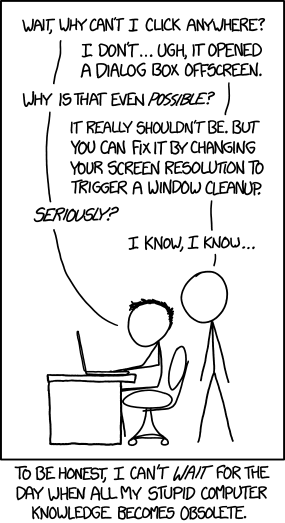
So much knowledge...

XKCD hit the nail on the head...


Monday, January 26, 2015

New job...same P.I.C.N.I.C's


Well it's been almost 3 years since my last post, but my current job has prompted me to revive the blog. I've said for years that IT folks must be invisible. We HAVE to be! We go into an office, or other location, to work on a technical problem and the people in the room seem to forget we have ears, or think they can push an imaginary "mute" button so we don't hear anything being discussed while we are present. I'll just say this... if you want information or "dirt" on someone, find your nearest IT tech. You can guarantee they've heard or seen something you'd be interested in.

Take today for example, our office is fairly large. After being "evicted" from our actual office, I had to find someplace for me and my 3 techs to "live." I found a storage room, that was once a small conference room, that was literally filled from floor to ceiling, and wall to wall with old, discarded or retired IT equipment. There was everything in there from retired rack mount servers to some old dinosaur of a PC that looked like it was made in the 70's. Under all that was a large table and a few broken down chairs. We Cleaned everything out, and I had 4 decent sized cubicles installed. It still has IT equipment in it, but 99% is usable, or stacked to go to PC recycle. We have plenty of room, and a door. It's nice to be able to close the door and get some quiet, not to mention regulate the temperature in the room (we also have a network/server rack in the room) since we don't control the thermostat. Today the door was closed and me and one of my tech's were working trouble tickets at our desks. The door opens and in walks the Senior Manager of our call center, followed by the director of the call center. They close the door and begin discussing an issue with a couple of employees. Not discussing them with us, but between each themselves. After a few minutes of discussion, the director says he will take care of the issue, they walk out and close the door. My tech sends me an IM (he literally sits 4 feet from me): "IT so unassuming they do secrets meetings in our office while we're in here"

So just remember, just because we're quiet, unassuming, and may not be very talkative does not equate to our being deaf or blind. 

Thursday, May 10, 2012

Yesterday morning I was walking down the hall to my office when one of the directors yelled at me (and not nicely) and told me his laptop was messing up again. I walked in to see what was going on as he was closing the lid on the laptop while it was on the docking station. He pointed at the monitor (which was attached to the docking station) and said "The monitor keeps turning off. There must be something wrong with my laptop!" Before I could say anything, he opened the laptop, pushed the power button, and right as the monitor was coming on, he closed the lid again...causing the monitor to go off again. He very firmly told me "I need you to fix this right now! I don't have time for this!"

For those of you that aren't familiar with laptops, they are designed to go to sleep when you close the lid. This particular user has had this laptop and docking station for 4 years, and has been told this multiple times.

He got out of his chair and I walked over and pushed the power button on the docking station, not on the laptop, to wake the computer up. As the monitor was coming back on and showing the login screen, I just smiled at him and walked out of his office...still not saying a word.

/facedesk