As an IT professional, one of my biggest pet peeves are forwards warning me of dire events or telling me if I don't send this to 50 people, something bad will happen to me. This little irritation began many years ago when I was working at Microsoft. I supported MSMail and Exchange. For those of you who don't know what these are, they are email programs, but on the server side. They are what processes the email, send/receive it, and put it in the correct mailbox. That's not the exact technical description, but a general description so you know what I'm talking about. I was at work one day and got an email from a family member saying if I forwarded it on, Bill Gates was going to give everyone that forwarded it a very large sum of money. The email went on the say Microsoft was testing an email tracking software. I showed it to a co-worker and was like "We are??" That began my distaste for this kind of email.
That particular email has changed over the years and shows up every few months. I've seen the same email with Pepsi, AT&T, Coca-Cola, and recently Google, but the general idea was someone was going to pay the forwarder a large sum of money just for forwarding the message on.
There are a few things I want people to think about before forwarding messages or re-posting things on their Facebook page. First, if it sounds to good to be true...it probably is. Take 2 minutes and do a few internet searches. I bet you can find your own answers.
Second, does it sound fishy? Is someone asking you for your bank account number or personal information so they can send you a large sum of money? Is the email coming from outside the US? Again, it's probably a scam or hoax.
Third, check http://snopes.com/. I bet you'll probably find your email or re-post listed on this page somewhere. Snopes will tell you if it's true, partially true, or false. It will also give you some history on where it started.
Finally, if you've done your research and found what your sending or posting to be factual, please remove all the forwarded email addresses before sending it along. Just send the body of the original message. I usually even go so far as to send it to people using BCC so I don't inadvertently give out someones email address.
A little common sense goes a long way. As the subject says, think before your forward. If you're sending from a work email address, you'll make your IT people happy. If you're sending it to a group of friends, the 5th or 6th person to forward the same email won't be broadcasting your (or my) email address to strangers. If you want more information, please feel free to message me. I'd prefer to have a ton of messages with sincere questions than to get a mailbox full of unnecessary forwards.
Sunday, December 5, 2010

Wednesday, October 13, 2010
Techologically challenged
This morning an end user showed up a day early for his appointment with another tech because he was in town sooner than expected. The tech he had the appointment with was out of the office for the day, so I offered to take care of him in my co-workers absence. I worked on his laptop and found nothing really wrong but user error. The end user left happy and newly educated.
This afternoon, another tech sends me an email saying the same end user from this morning was trying to get in touch with me. I called the user and asked how I could help. He said since he had gotten back to his home office he was unable to connect to his wireless network. I asked him to read what wireless connections were showing available and he said none. I asked him to tell me what color the light was on his wireless card, red or blue. He said red. I instructed him to touch it (it's a touchpad) and tell me if it turns blue. Of course it did, and all of his wireless connections suddenly appeared. His wireless had gotten turned off.
He exclaimed I was a genius and happily hung up the phone. ROFL!
I love my job...it keeps me entertained.
This afternoon, another tech sends me an email saying the same end user from this morning was trying to get in touch with me. I called the user and asked how I could help. He said since he had gotten back to his home office he was unable to connect to his wireless network. I asked him to read what wireless connections were showing available and he said none. I asked him to tell me what color the light was on his wireless card, red or blue. He said red. I instructed him to touch it (it's a touchpad) and tell me if it turns blue. Of course it did, and all of his wireless connections suddenly appeared. His wireless had gotten turned off.
He exclaimed I was a genius and happily hung up the phone. ROFL!
I love my job...it keeps me entertained.
Friday, October 1, 2010
DVD player woes
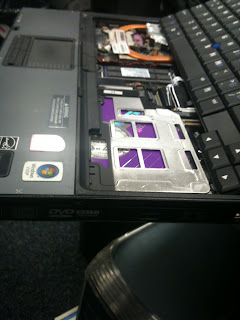
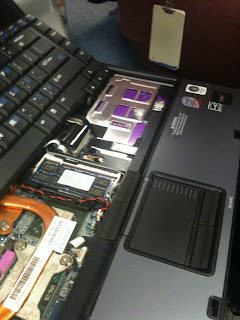
A co-worker came over a few minutes ago with a laptop from one of our end users. He had the keyboard popped up so you can see the system board and such. I noticed a big purple area over where the DVD player is located. Upon closer investigation, I realized the user had somehow managed to shove a CD above the drive, wedging it between the bay and the actual drive. Keep in mind the DVD drives we use are completely closed, and have a tray that slides out for the disc. WTH? How did they manage to do that?!?!


Tuesday, September 14, 2010
Almost...but not quite
Received a laptop that was shipped in by one of my end users today. It came in a really nice laptop shipping box. The box is perfect, nice and padded, cradling the laptop perfectly. One minor detail he forgot... TAPE THE FREAKING BOX SHUT!
...just saying...
...just saying...
Wednesday, September 8, 2010
Management epic fail
So yesterday I had a new user call that had just received her system. She had lost the paper that had her username and password. I called Data Security and got it for her. Then I walked her through changing the password. Not difficult. Later in the day I get the below email forwarded to me by our dispatcher from the manager of the Helpdesk:
Can you find out exactly how this was done? Did it require tools that the helpdesk doesn’t have? Do we need an updated script?
Spoke with EU. Gave her credentials. Walked through changing password. Contacted DS and let them know. Closing ticket.
*** CASE CLOSED 09/07/2010 04:21:00 PM Spoke with EU. Gave her credentials. Walked through changing password. Contacted DS and let them know. Closing ticket.
***STATUS CHANGE 09/07/2010 16:27:18
I saw this and was like, huh? So I replied to her with this:
All I did was give her the new username and password (that I had to call Data Security to get), got her logged in, walked her through connecting to VPN, walked her through changing her password, then called Data Security and told them she had changed her password so they could turn her PeopleSoft stuff back on. Not rocket science. If he needs step by step on how to change a password let me know.
So this morning she forwards me another email from him wanting step by step instructions. I was like really?? Seriously?? So, being the smart ass I am, here’s how I replied:
Here are the steps I took:
1) Gave EU her new credentials
2) Had her type username and password in
3) Verified she had an internet connection
4) Had her open VPN client
5) Had her select tunnel to Modesto and click connect
6) Once connected to VPN, had her hit CTL+ALT+DEL and click change password
7) Once back to the desktop had her hit CTL+ALT+DEL to lock system
8) Had her hit CTL+ALT+DEL to log back on
9) Contacted Data Security to let them know EU had possession of her system so they could turn her personal access back on
Here is a link to the Microsoft page on how to change a password in case there are further questions:
http://windows.microsoft.com/en-US/windows-vista/Change-your-Windows-password
I know it was probably a career limiting move, but I just couldn’t resist. I did stop short of saying CTL+ALT+DEL was a utility built into Windows since Dr. DOS. LOL
Can you find out exactly how this was done? Did it require tools that the helpdesk doesn’t have? Do we need an updated script?
Spoke with EU. Gave her credentials. Walked through changing password. Contacted DS and let them know. Closing ticket.
*** CASE CLOSED 09/07/2010 04:21:00 PM Spoke with EU. Gave her credentials. Walked through changing password. Contacted DS and let them know. Closing ticket.
***STATUS CHANGE 09/07/2010 16:27:18
I saw this and was like, huh? So I replied to her with this:
All I did was give her the new username and password (that I had to call Data Security to get), got her logged in, walked her through connecting to VPN, walked her through changing her password, then called Data Security and told them she had changed her password so they could turn her PeopleSoft stuff back on. Not rocket science. If he needs step by step on how to change a password let me know.
So this morning she forwards me another email from him wanting step by step instructions. I was like really?? Seriously?? So, being the smart ass I am, here’s how I replied:
Here are the steps I took:
1) Gave EU her new credentials
2) Had her type username and password in
3) Verified she had an internet connection
4) Had her open VPN client
5) Had her select tunnel to Modesto and click connect
6) Once connected to VPN, had her hit CTL+ALT+DEL and click change password
7) Once back to the desktop had her hit CTL+ALT+DEL to lock system
8) Had her hit CTL+ALT+DEL to log back on
9) Contacted Data Security to let them know EU had possession of her system so they could turn her personal access back on
Here is a link to the Microsoft page on how to change a password in case there are further questions:
http://windows.microsoft.com/en-US/windows-vista/Change-your-Windows-password
I know it was probably a career limiting move, but I just couldn’t resist. I did stop short of saying CTL+ALT+DEL was a utility built into Windows since Dr. DOS. LOL
Thursday, April 15, 2010
I don't have a brain...can you help me?
The following is an actual conversation between me and an end user:
End user: My computer keeps turning off on it's own!
Me: Are you using a docking station for your laptop?
End user: Yes I have a docking station.
Me: Is the green light on?
End user: No it isn't.
Me: Hit the power button on the docking station and tell me if the green light comes on.
End user: It doesn't come on.
Me: Is the blue light on that indicates the laptop is connected to the dock?
End user: No. Does the laptop have to be sitting in the docking station?
Me: ..... yes ma'am. Where is your laptop?
End user: It's sitting on my desk.
Me: So it's not on your docking station?
End user: No, my docking station is on the other side of my desk and I need my computer where it is.
Me: Ok. Do you have your travel AC adapter with you?
End user: Yeah...it's in my bag.
Me: Can you get it out and plug it into the laptop?
End user: Sure...but I don't know how that will help.
I hear her rustling around in the background...
End user: Do I need to plug it into the wall as well?
Trying to seriously stifle a laugh and rude comment...
Me: Yes ma'am
I hear more rustling in the background...then the Windows startup sound.
End user: Hey! My laptop just came back on!
Me: Yes ma'am. It sounds like your battery died. You'll need to leave it plugged in so the battery can charge all the way up.
End user: Oh...so it doesn't charge the battery if it's not on the docking station.
Me: No ma'am
Yes...that really happened. ROFL
End user: My computer keeps turning off on it's own!
Me: Are you using a docking station for your laptop?
End user: Yes I have a docking station.
Me: Is the green light on?
End user: No it isn't.
Me: Hit the power button on the docking station and tell me if the green light comes on.
End user: It doesn't come on.
Me: Is the blue light on that indicates the laptop is connected to the dock?
End user: No. Does the laptop have to be sitting in the docking station?
Me: ..... yes ma'am. Where is your laptop?
End user: It's sitting on my desk.
Me: So it's not on your docking station?
End user: No, my docking station is on the other side of my desk and I need my computer where it is.
Me: Ok. Do you have your travel AC adapter with you?
End user: Yeah...it's in my bag.
Me: Can you get it out and plug it into the laptop?
End user: Sure...but I don't know how that will help.
I hear her rustling around in the background...
End user: Do I need to plug it into the wall as well?
Trying to seriously stifle a laugh and rude comment...
Me: Yes ma'am
I hear more rustling in the background...then the Windows startup sound.
End user: Hey! My laptop just came back on!
Me: Yes ma'am. It sounds like your battery died. You'll need to leave it plugged in so the battery can charge all the way up.
End user: Oh...so it doesn't charge the battery if it's not on the docking station.
Me: No ma'am
Yes...that really happened. ROFL
Friday, April 9, 2010
Epic fail
Evidently some of our corporate users feel it's ok to deface company equipment or personalize them like they belong to them. A tech brought a system in earlier that someone had hand painted the department name on the lid of the laptop...in White Out. Yeah...really. I didn't think to take a picture at the time, that would've been awesome!
I just got a system in for repair from one of my users that decided his laptop needed some color. Not exactly sure why they feel it's ok, but for some reason they do.
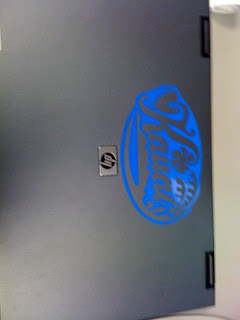
I just got a system in for repair from one of my users that decided his laptop needed some color. Not exactly sure why they feel it's ok, but for some reason they do.

Subscribe to:
Posts (Atom)