Tuesday, October 1, 2024

A way overdue post!

 It's been a long time since my last post, and a lot has changed since then. I went through a divorce, ran into the love of my life after being apart for 27 years and got married, COVID, got laid-off, was unemployed for over a year, lost my father, moved to a different city, and recently started a new job.

There's a lot more that went on in between but needless to say the last 9 years have been a bit crazy.

Today's post actually happened to me, and it makes me laugh every time tI see the error message. I was working in Visio, making some diagrams, and all of a sudden Visio froze and this error popped up:


This takes the prize for the "Most Ambiguous Error" I have ever seen in my career. I still have no idea what caused it, and haven't been able to replicate it! What are some crazy errors you've seen? Post them in the comments!

Tuesday, July 14, 2015

Motivation

The past few days I've been feeling a little down and defeated. It's been a struggle just to get up and get dressed. I opened Facebook to see what was happening in my friends lives and came across this video. It really struck a cord with me and I wanted to take a break from the "Stupid Human Tricks" for a few minutes and share it with you. I hope it resounds with you as it did me. Life is short. Make the best of it.


It's soooo confusing!


This morning I was working on the VP of HR's laptop and noticed our "wonderful" antivirus had an alert. I opened it up and checked out the log to see what it found. It showed malware being active. So I click on the log and it show "Task stopped." Cool! It actually worked like it was supposed to! 

My curiosity kicked in and I had to see what it found, so I click to get more information. Under application name it showed...the name of our "wonderful" antivirus! So it basically killed itself thinking it was malware. Priceless!

I knew our company antivirus was crap, but this just made me laugh! Of course I had to screenshot it and send it to the person in charge of our antivirus! Gotta love cheapskates!


Monday, June 22, 2015

All hands on deck!


Friday, my boss told me to have all my guys show up before 8a today for a department move. We have staggered start times, so for a couple of my guys this is pretty early. With the promise of breakfast burrito's and donuts, everyone showed up at the designated time. The plan was to un-box and setup all the new equipment, and image all the computers (meaning to install the operating system and necessary software) in place to save time.

We loaded up our cart with all the equipment needed to move the requested department into the new area, and headed out to start the day before it got too hot. We support the smallest distribution center (warehouse) in our company, and it covers just over 600,000 square feet. It is not temperature controller, so during the Texas summers it tends to get a little warm.

While the guys were taking the equipment over, I stayed behind to finish a few things up, then headed over to check on them. When I walked up, they are all standing around with all the equipment still on the cart. My most senior tech walks over.

Nick: Is this the right place? Or is it over there? (He points a ways off)
Me: No, this is it. Why? What's wrong?
Nick: There's no power.
Me: *looks around* What?
Nick: Remember last summer when we moved that other department out of this area? They had everything connected to one 25 foot extension cord and a really long power strip?
Me: ...oh yeah. Let's go find

So off we go to talk to the manager, who is still in the morning warehouse meeting. I open the door to the conference room and am greeted with some "not so friendly" glares.

Operations Director: Can I help you?
Me: We're trying to do the move for , but there's no power in the area.
Facilities supervisor: Oh, well they're coming to pull electrical over there tomorrow.
Me: ...*turns around and walks out*

For this being a technology company, they sure don't think things through very much.
/smh


Friday, June 19, 2015

I love you man!


Our Desktop team is a little "eclectic." We are all weird, geeky, and have very odd senses of humor. That's what makes us "fit" and work so well together. One of my guys was out sick yesterday, and when he came in this morning, the following short conversation had me laughing hard!

Tech 1: Missed you yesterday dude. I actually had to do work and stuff. It was weird.
Tech 2: You want a hug?
Tech 1: Get away from me bro.
Tech 2: Fist bump?
Tech 1: Dude...seriously...

I love these guys! ROFL

Monday, March 23, 2015

Houston, we have a problem


Manager: I need you to image 5 computers for packing stations in the warehouse.
Me: Ok. I've never imaged those particular computers. Do you know where the image file is located?
Manager: Ask William. He'll know.

Me: William, where can I find the pack station image?
William: It should be on the CIFs.
Me: Do you know WHICH share?
William: Ask the guys in Ohio. They should know.

Me: Hey guys, do you know where I can find the pack station image?
Ohio tech: It's on the shared drive.
Me:...WHERE on the shared drive?
Ohio tech:The two images we use the most are SpeedFbuntu-10.04-packing-new-building
for pack station and SpeedFbuntu-10.04-the-rest-new-building for lead or returns stations.
Me: Ok...but WHERE on the share are they located??
Ohio tech: *silence*
Ohio Lead: The images we use won't work at your location.
Me: *sigh*

Yep...it's Monday.


Friday, March 6, 2015

Ah management...


I thought I'd do something a little different in this post. We have a weekly meeting/conference call. This is what one of my tech's Tweeted (and FYI, I'm not the boss he was referring to...lol) He was Tweeting this live during our meeting and told me about it after the fact. He is referring to systems that I had put together a few months ago. 

 First Tweet: "Yeah, you know that spreadsheet you do everyday to track your work? Yeah, that's been useless. So we're going to expand it."
My boss ladies and gentlemen.

Second Tweet: "Hey, you know that asset tracking system you put together and I told you we were going to do something else? Yeah, keep doing that system anyways."

Final Tweet: "On second thought, yeah don't do that. The original plan we shelved you for is back on. Or maybe not. Wait, I don't want to make decisions."

I love this guy! LOL

Friday, February 20, 2015

And people wonder why tech's don't talk much...


Today I had been working on some computers in the call center and was walking back to my office. A young lady in one of the cubicles yelled at me as I was passing by...

Young lady: Stormy! Help!
Me: What's going on?
Young lady: It did it again! My computer keeps freezing up! I keep rebooting but then it freezes up after a little bit!

I look at her screen and see her browser has frozen up but the PC itself was still working, albeit slow.

Me: What all do you have open right now?
Young lady: It's not that. I only have two things open!

I hover the mouse over one of the icons on her task bar and notice it has 15 incidents of the same program running, and next to it are Pandora and YouTube.

Me: You've got too many things running and it's slowing your computer down. Try closing your streaming music and videos, and only run the work related programs. And why do you have so many instances of our chat program running??
Young lady: I have to have those open, it's how I communicate with the agents. And I can't close the music! I HAVE to have music playing!

This ^^ This right here is why tech's don't say much. We really don't want to get fired or involved with HR. I just shook my head and walked away.

Thursday, January 29, 2015

The weakest link...

This afternoon I was talking to one of my tech's at another location and asked him to check on one of the end users in his building. She had contacted me about an issue on her PC one of the other tech's had worked on, and now she was having more issues. I knew he could handle it, so I was giving him the basics of the issue. Here's our chat in IM:

Me: Has *user name*  called you yet?
Tech: It doesn't appear so
Me: *other tech name* worked on her computer and now she's having more issues. I told her to call you and you would help her...lol
Tech: he's been playing with paging file on his pc, i'd be willing to bet he messed with hers as well lol
Me: Paging file isn't going to make it run faster
Tech: I know this and you know this but...
Me: LOL
Tech: Anymore around here I just shake my head and walk away
Me: If you have time today or tomorrow, would you go see her? Set her page file back to default?
Tech: Night before last spent 4 hours stripping the ends of an ethernet cable to put an RJ45 connector on it..........
Me: He probably either shrunk the page file or made it too big for the drive to handle
Me: Wait...4 hours??
Tech: Yes, stripping each individual wires, and it not work so he would try over and over...
Me: Wow...
Me: Tell him to stop...just...stop...that makes my head hurt
Tech: You can't make this stuff up lol

There's one on every team...lol.

Wednesday, January 28, 2015

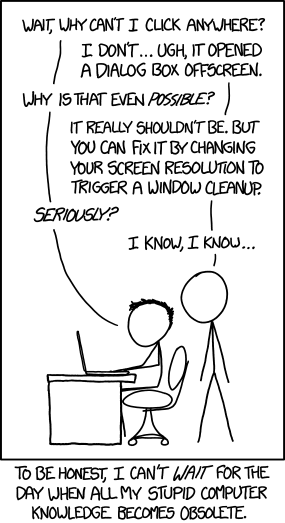
So much knowledge...

XKCD hit the nail on the head...


Monday, January 26, 2015

New job...same P.I.C.N.I.C's


Well it's been almost 3 years since my last post, but my current job has prompted me to revive the blog. I've said for years that IT folks must be invisible. We HAVE to be! We go into an office, or other location, to work on a technical problem and the people in the room seem to forget we have ears, or think they can push an imaginary "mute" button so we don't hear anything being discussed while we are present. I'll just say this... if you want information or "dirt" on someone, find your nearest IT tech. You can guarantee they've heard or seen something you'd be interested in.

Take today for example, our office is fairly large. After being "evicted" from our actual office, I had to find someplace for me and my 3 techs to "live." I found a storage room, that was once a small conference room, that was literally filled from floor to ceiling, and wall to wall with old, discarded or retired IT equipment. There was everything in there from retired rack mount servers to some old dinosaur of a PC that looked like it was made in the 70's. Under all that was a large table and a few broken down chairs. We Cleaned everything out, and I had 4 decent sized cubicles installed. It still has IT equipment in it, but 99% is usable, or stacked to go to PC recycle. We have plenty of room, and a door. It's nice to be able to close the door and get some quiet, not to mention regulate the temperature in the room (we also have a network/server rack in the room) since we don't control the thermostat. Today the door was closed and me and one of my tech's were working trouble tickets at our desks. The door opens and in walks the Senior Manager of our call center, followed by the director of the call center. They close the door and begin discussing an issue with a couple of employees. Not discussing them with us, but between each themselves. After a few minutes of discussion, the director says he will take care of the issue, they walk out and close the door. My tech sends me an IM (he literally sits 4 feet from me): "IT so unassuming they do secrets meetings in our office while we're in here"

So just remember, just because we're quiet, unassuming, and may not be very talkative does not equate to our being deaf or blind. 

Thursday, May 10, 2012

Yesterday morning I was walking down the hall to my office when one of the directors yelled at me (and not nicely) and told me his laptop was messing up again. I walked in to see what was going on as he was closing the lid on the laptop while it was on the docking station. He pointed at the monitor (which was attached to the docking station) and said "The monitor keeps turning off. There must be something wrong with my laptop!" Before I could say anything, he opened the laptop, pushed the power button, and right as the monitor was coming on, he closed the lid again...causing the monitor to go off again. He very firmly told me "I need you to fix this right now! I don't have time for this!"

For those of you that aren't familiar with laptops, they are designed to go to sleep when you close the lid. This particular user has had this laptop and docking station for 4 years, and has been told this multiple times.

He got out of his chair and I walked over and pushed the power button on the docking station, not on the laptop, to wake the computer up. As the monitor was coming back on and showing the login screen, I just smiled at him and walked out of his office...still not saying a word.

/facedesk

Tuesday, March 20, 2012

Flush the DNS bro!

It's been a while since I've posted anything here, but nothing tremendously funny or stupid has happened in a while...until today. This was a conversation via inter-office messenger at our Helpdesk.

Did you know that computers can manage the flushing of automatic toilets? Apparently they do at the county Jail. Humor may be limited to computer peoples (:

Maitl*******) [4:39 PM]:
I just got a call from MLK, the computer that manages flushing the toilets is locked up... Constipated
Kirch*******) [4:39 PM]:
I've taken that call before.
At the jail, right?
Hog*******) [4:40 PM]:
tell them to flush...the dns
Maitl*******) [4:40 PM]:
right
Johnson, Benjamin (benjohns) [4:40 PM]:
do we base priority on how bad the smell is?
Maitl*******) [4:40 PM]:
LOL Nick
Yad*******) [4:40 PM]:
This is the county, it's only a sev 3.
Johnson, Benjamin (benjohns) [4:40 PM]:
fact
Hog*******) [4:40 PM]:
the one system you DON'T want "backed up"
Yad*******) [4:40 PM]:
If they ask what that smell is, say 'Incumbents'
Johnson, Benjamin (benjohns) [4:41 PM]:
is that the POS computer?
did you have them chek the dump file?
Hog*******) [4:41 PM]:
seriously just choked on my chipotle
Johnson, Benjamin (benjohns) [4:42 PM]:
choked on the chicken...
Kirch*******) [4:42 PM]:
that was corny
Maitl*******) [4:42 PM]:
the smell got to him he didn't even know the username
he is going to check with the facilitators
Hog*******1) [4:42 PM]:
it's only corny because it can't process it
Kirch*******) [4:42 PM]:
thats-the-joke.jpg

Wednesday, February 22, 2012

It's not a flash drive!

I just got a P1 ticket (highest priority for tickets) for a new wireless keyboard and mouse that wasn’t working. The helpdesk escalated to me. So I called the user and asked them to explain what was going on. They said they just got this new wireless mouse and keyboard and it wouldn’t work. I said ok, and asked what all came in the box. They said the mouse and keyboard.

Me: Was there a third piece in the box?

User: Well there is this little flash drive that came with it.

Oh yeah….wait for it.

Me: Ok…go ahead and plug that into a USB port on your dock or the laptop.

User: Ok…oh…hey…it’s working!

Me: Yeah, that isn’t a flash drive. It’s the transceiver for the wireless keyboard and mouse.

User: Well I feel like an idiot…

I so had to bite my tongue to keep from laughing out loud! And to top it off, it was escalated from the Helpdesk! LOL

Tuesday, November 22, 2011

Some people should not have computers...

Since I work with the same group of people all the time, I have gotten to know most of them pretty well. There are some I'm happy to work with and enjoy the banter over the phone. Some...as soon as I see their name in my queue I just hang my head and sigh. One user in particular almost makes me want to slit my wrists.

Last week I got a ticket for him stating his system had a virus. I called him and he had a really nasty one that I wasn't able to clean. I had him ship his system in to be wiped and re-imaged. Once I received it, I wiped the drive, re-installed Windows, set everything backup, and shipped it back to him. I asked him to call me when he received it so we could go over the system to make sure no applications were missing or settings were missed. When it arrived, he called in a complete "the sky is falling" panic, and according to him the system didn't work at all. I was like "WTH?" After listening to him rant and rave for a few minutes I realized his computer was working, he just couldn't get connect to VPN. I checked his account and realized he had let his network password expire. After some "creative engineering" I was able to get into his system and help him get connected to VPN and back on the network.

He mentioned a couple of other things that needed my attention, one of which required him going to a specific website. I asked him to type the URL in the address bar. The following conversation occurred:

Me: Open Internet Explorer and type the address is the address bar

User: I can't.

Me: What do you mean you can't? Did you mouse click on the address bar in the browser?

User: Yes. Nothing happened.

Me: Did the address turn blue when you clicked it?

User: Yes, but now it's not.

Me: Is there a flashing cursor at the end of the address?

User: Yes.

Me: Ok. Use the backspace key and clear the address out.

User: But won't that take me away from the homepage

Me: No, it just clears the address so you can type a new one there and go to the website I asked you to go to.

User: Ok...but I don't think that's going to work.

...dude...really??

Me: It will work. Just clear that address out like I told you and type in the new one.

User: Ok...

I hear typing and clicking in the background.

User: Ok I did what you said but it's still on the same webpage. I told you it wouldn't work.

At this point I'm really gritting my teeth and trying to stay nice.

Me: After you typed the address in, did you hit enter?

User: No.

Me: Is the cursor still flashing at the end of the address you just typed.

User: Yes

Me: Ok, just hit enter.

User: I don't know what good that's going to do.

Me: Just hit enter and it will work.

User: Ok, it looks like it's going to the website.

The call just got progressively worse from that point, but after 5 hours on the phone taking care of little adjustments and settings (that should have taken less than an hour), he was back up and running. After incidents like that, I see why people drink on the job! I told a co-worker we needed to take that guys computer away and give him a Big Chief pad and a Crayon.

Friday, September 9, 2011

More stupid users

It's been a long time since I've come across anything worthy enough to post here, but I think this one tops the list. An end user had a laptop with an extended life battery. He didn't want to lose it or for someone to steal it, so he used Liquid Nails to glue it to the bottom of his laptop. Long story short, the tech in his area had to bring the system to our office to repair it. It took us a few hours to finally pry the extended battery off, pretty much destroying the bottom of the laptop case in the process.

This is a picture of the bottom of the laptop and the extended battery. The regular battery had already been removed:


Here are closer pictures of the damage:


Sunday, December 5, 2010

Think before you forward

As an IT professional, one of my biggest pet peeves are forwards warning me of dire events or telling me if I don't send this to 50 people, something bad will happen to me. This little irritation began many years ago when I was working at Microsoft. I supported MSMail and Exchange. For those of you who don't know what these are, they are email programs, but on the server side. They are what processes the email, send/receive it, and put it in the correct mailbox. That's not the exact technical description, but a general description so you know what I'm talking about. I was at work one day and got an email from a family member saying if I forwarded it on, Bill Gates was going to give everyone that forwarded it a very large sum of money. The email went on the say Microsoft was testing an email tracking software. I showed it to a co-worker and was like "We are??" That began my distaste for this kind of email.

That particular email has changed over the years and shows up every few months. I've seen the same email with Pepsi, AT&T, Coca-Cola, and recently Google, but the general idea was someone was going to pay the forwarder a large sum of money just for forwarding the message on.

There are a few things I want people to think about before forwarding messages or re-posting things on their Facebook page. First, if it sounds to good to be true...it probably is. Take 2 minutes and do a few internet searches. I bet you can find your own answers.

Second, does it sound fishy? Is someone asking you for your bank account number or personal information so they can send you a large sum of money? Is the email coming from outside the US? Again, it's probably a scam or hoax.

Third, check http://snopes.com/. I bet you'll probably find your email or re-post listed on this page somewhere. Snopes will tell you if it's true, partially true, or false. It will also give you some history on where it started.

Finally, if you've done your research and found what your sending or posting to be factual, please remove all the forwarded email addresses before sending it along. Just send the body of the original message. I usually even go so far as to send it to people using BCC so I don't inadvertently give out someones email address.

A little common sense goes a long way. As the subject says, think before your forward. If you're sending from a work email address, you'll make your IT people happy. If you're sending it to a group of friends, the 5th or 6th person to forward the same email won't be broadcasting your (or my) email address to strangers. If you want more information, please feel free to message me. I'd prefer to have a ton of messages with sincere questions than to get a mailbox full of unnecessary forwards.

Wednesday, October 13, 2010

Techologically challenged

This morning an end user showed up a day early for his appointment with another tech because he was in town sooner than expected. The tech he had the appointment with was out of the office for the day, so I offered to take care of him in my co-workers absence. I worked on his laptop and found nothing really wrong but user error. The end user left happy and newly educated.

This afternoon, another tech sends me an email saying the same end user from this morning was trying to get in touch with me. I called the user and asked how I could help. He said since he had gotten back to his home office he was unable to connect to his wireless network. I asked him to read what wireless connections were showing available and he said none. I asked him to tell me what color the light was on his wireless card, red or blue. He said red. I instructed him to touch it (it's a touchpad) and tell me if it turns blue. Of course it did, and all of his wireless connections suddenly appeared. His wireless had gotten turned off.

He exclaimed I was a genius and happily hung up the phone. ROFL!

I love my job...it keeps me entertained.

Friday, October 1, 2010

DVD player woes

A co-worker came over a few minutes ago with a laptop from one of our end users. He had the keyboard popped up so you can see the system board and such. I noticed a big purple area over where the DVD player is located. Upon closer investigation, I realized the user had somehow managed to shove a CD above the drive, wedging it between the bay and the actual drive. Keep in mind the DVD drives we use are completely closed, and have a tray that slides out for the disc. WTH? How did they manage to do that?!?!


Tuesday, September 14, 2010

Almost...but not quite

Received a laptop that was shipped in by one of my end users today. It came in a really nice laptop shipping box. The box is perfect, nice and padded, cradling the laptop perfectly. One minor detail he forgot... TAPE THE FREAKING BOX SHUT!

...just saying...